inFlow Inventory 2.4.0.3
Updated on 02 Mar 2012
By Anthony Buckner
By Anthony Buckner
Specifications
License:
Demo (Free to try)
Updated:
Downloads:
1684
Platform:
Windows (All Versions)
Publisher:
Archon Systems(more)
Website:
User Reviews:
Other versions:
Do you like
inFlow Inventory?
inFlow Inventory?
FindMySoft Editor's Review
inFlow Inventory - Inventory System
Running a business can be challenging for anyone, and being organized and knowing every aspect of the business are very important. Using pen and paper for this is not enough for most people. A much better idea would be using a specialized software for organizing every aspect of a business. One such program is inFlow Inventory. This program allows anyone to track inventory, manage orders and so on, making the business much more efficient.
The program can be run from any Windows version, ranging from XP to Windows 7. The installation process takes some time to complete, as a lot of program components must be downloaded from the Internet. Having a slow Internet connection will make the installation process a lengthy one. The system resources won't be affected by running inFlow Inventory, as the requirements are the lowest possible.
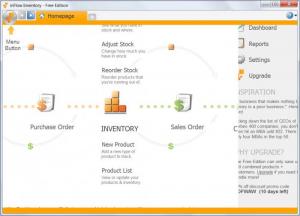
inFlow Inventory has a clean interface, and also intuitive for the ones already familiar with other inventory software programs. However, if you are not, there is an excellent training video and sample setup waiting to guide you through the program. inFlow is dominated by four major tabs for organizing a business. The tabs are Sales, Purchasing, Inventory, and Reports, each offering an interconnected way to stay on top.
By drawing information on customers, warehouse stock, pending orders, sales, and more, these tabs sync up nicely with a wealth of options that are certain to be useful for most small business managers. From providing customers quotes, looking at warehouse stock, and running reports on last month's sales, the program offers an impressive array of options.
There are a lot of settings and options available that allow one to customize the program's functionality and also the appearance. The interface is built in such a way that the user can quickly spot a desired order or any other type of information. For more advanced users, the program offers an option for upgrading to a paid version which includes a lot more options than the free one.
Pros:
It allows one to easily manage and organize every aspect of his business. The interface is simple to use and features some interconnected tabs. Besides that, the program can be upgraded to a more advanced version which is ideal for experienced businessmen.
Cons:
The free version doesn't include all the features an experienced businessman may need.
inFlow Inventory is a neat software that allows you to organize all the aspects of your business.
The program can be run from any Windows version, ranging from XP to Windows 7. The installation process takes some time to complete, as a lot of program components must be downloaded from the Internet. Having a slow Internet connection will make the installation process a lengthy one. The system resources won't be affected by running inFlow Inventory, as the requirements are the lowest possible.
inFlow Inventory has a clean interface, and also intuitive for the ones already familiar with other inventory software programs. However, if you are not, there is an excellent training video and sample setup waiting to guide you through the program. inFlow is dominated by four major tabs for organizing a business. The tabs are Sales, Purchasing, Inventory, and Reports, each offering an interconnected way to stay on top.
By drawing information on customers, warehouse stock, pending orders, sales, and more, these tabs sync up nicely with a wealth of options that are certain to be useful for most small business managers. From providing customers quotes, looking at warehouse stock, and running reports on last month's sales, the program offers an impressive array of options.
There are a lot of settings and options available that allow one to customize the program's functionality and also the appearance. The interface is built in such a way that the user can quickly spot a desired order or any other type of information. For more advanced users, the program offers an option for upgrading to a paid version which includes a lot more options than the free one.
Pros:
It allows one to easily manage and organize every aspect of his business. The interface is simple to use and features some interconnected tabs. Besides that, the program can be upgraded to a more advanced version which is ideal for experienced businessmen.
Cons:
The free version doesn't include all the features an experienced businessman may need.
inFlow Inventory is a neat software that allows you to organize all the aspects of your business.
Do you like inFlow Inventory
Quick Look VideoNew
Popular News
The free AboutOne app is currently exclusive to Windows Phone. The app is available for free in the Markeplace.
Google rolled out Chrome 19 to the Stable Channel. This version fixes some security problems and adds tab syncing capabilities.
inFlow Inventory Awards
inFlow Inventory Editor's Review Rating
inFlow Inventory has been reviewed by Jerome Johnston on
02 Mar 2012. Based on the user interface, features and complexity, Findmysoft has rated
inFlow Inventory
4
out of 5 stars, naming it ExcellentYour Rating
Top Downloads
2.
Opera5.
Trillian8.
AIM9.
Skype10.
Ad-Aware12.
Nero13.
Google Earth14.
Picasa15.
Winamp16.
iTunes17.
RealPlayer18.
uTorrent19.
eMule20.
WinRAR21.
BitComet22.
WinZip23.
Shareaza24.
CCleaner25.
Recuva26.
Tweak UI27.
CuteFTP Home29.
Adobe Reader30.
NewsPiperBecome A Fan!
Link To Us!
inFlow Inventory
HTML Linking Code
HTML Linking Code
Latest Reviews